
<img src="https://www.inventive-7-intuition.com/807131.png" style="display:none;">
 
Company Logo
3491-03 png


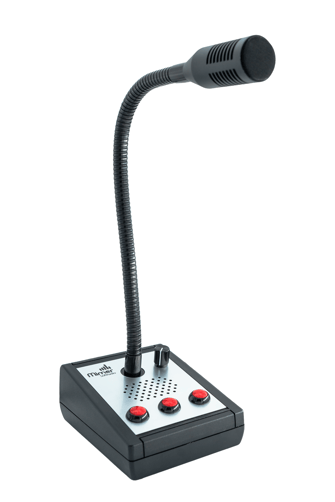
Tabletop Microphone - 3 buttons

Technical description and set-up instructions

Art n:o
3491/03
Revision
-
Release date
-

Tabletop Microphone - 3 buttons - Gooseneck mic, AGC, Built in speaker, HID based PTT, 1Kg, USB. Requires Mimer Multiple Hotkeys add-on 3049 
Use the microphone 

The microphone is optimized for use at a distance of approximately 10–20 cm from the user’s mouth. The built-in AGC (Automatic Gain Control) ensures stable and consistent audio levels by automatically adapting the gain to variations in speaking distance or volume

Connection 

Connect the microphone to a PC using the supplied USB A cable.

The device is presented to the operating system as a standard USB audio device and a HID (Human Interface Device) for the PTT function. This makes it fully compatible with Soft Radio as well as with third-party software that can use standard USB audio input and keyboardbased control.

From SoftRadio release 4.7.0 and onward, the microphone is automatically detected, and a pop-up prompt will ask whether to use the connected hardware. Earlier versions of Soft Radio also support the microphone, but without automatic detection.

PTT Setup 

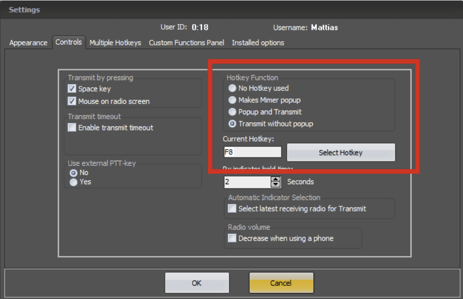
By default, the microphone uses the F8 hotkey for PTT operation.

Since the PTT operates as a HID keyboard input, it can be used in any application that supports key-based controls - for example VoIP clients, dispatch systems, recording software, or other communication tools.

A stand-alone configuration application is provided for changing the hotkeys used by the microphone. You can find it on the technical manuals card.

To fully utilize all Three buttons in Mimer SoftRadio the option Multi-HotKey needs to be installed, which in turn requires SoftRadio XL.

This tool allows the user to easily assign a preferred key for the PTT function, making the microphone fully adaptable to a wide range of third-party applications. 


3

Technical Specifications

Specification Details
Dimensions 100 x 130 x 65mm
Weight 1kg
Connection USB A


Enable hotkey functionality in SoftRadio and press the PTT button when assigning a hotkey. 


4
 
Mimer SoftRadio

Proudly made in Sweden

Connect Your Radios.
Anywhere. Over Any Network


Contact

LS Electronics AB

www.lse.se/contact-sales

info@lse.se