<img src="https://www.inventive-7-intuition.com/807131.png" style="display:none;">
 
Company Logo
image-png-Mar-10-2026-08-15-35-5095-AM


Mimer Virtual Network Interface

Technical description and set-up instructions — For the Kairos Base station

Art n:o
3281
Revision
-
Release date
Dec 11, 2020

This guide will help with the setup and use of your Mimer Virtual Network Interface. Please also refer to the standard manuals for Mimer SoftRadio found on: www.lse.se/setup, and the web page: www.lse.se/kairos. 

General

Mimer SoftRadio is a dispatch system that handles radios, intercoms and phones from a common PC GUI using IP as connection between all nodes in the system.

Radios are normally connected to the IP network through the use of a hardware Network Interface.

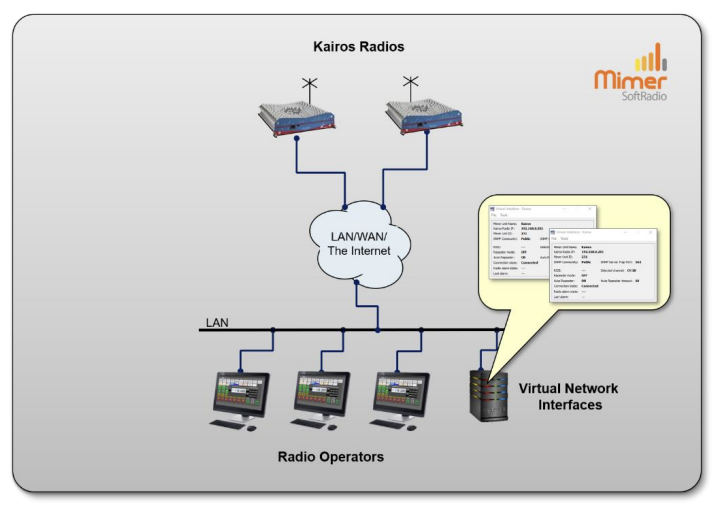
However, with the Virtual Network Interface - software in a PC or server, it is possible to connect Kairos* base stations, using their IP protocol, without using a hardware network interface.

The computer running this software can simultaneously handle up to eight instances of virtual interfaces to eight separate radios. The rest of the SoftRadio system can see no difference whether it is a virtual or a hardware interface. 


System example

Example system with two radios and three operators. The server computer handles the two Virtual Network Interfaces.


The Virtual Network Interface will work with all Kairos base stations.

As an alternative we also offer a standard hardware Network Interface that can be used with the same types of Kairos radios.

*The Kairos Base station is built by RadioActivity srl in Italy, a JVCKenwood company.

3

The operator GUI

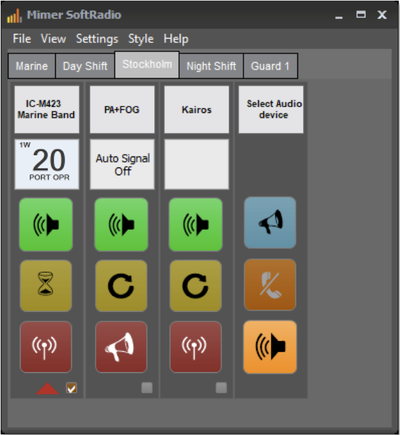
The operators will use the standard software Mimer SoftRadio to handle the radios connected through the Virtual Network Interfaces as well as other radios, phones and intercoms connected through standard SoftRadio setup.  

Example of SoftRadio with several types of radios connected. 


4

Virtual Network Interface installation

Recommended hardware and software

Any modern Windows server or PC with Windows 10, will work.

The PC/Server running the virtual interface may, or may not, have Mimer SoftRadio installed.

Mimer SoftRadio, at the operator, needs to be version 4.0.16 or higher for the Kairos virtual interface to work. 

Software installation

Run the installation from the supplied USB stick or online download. The installation will setup the virtual interface with default settings 

Software activation

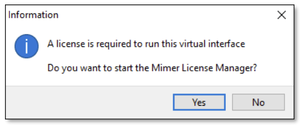
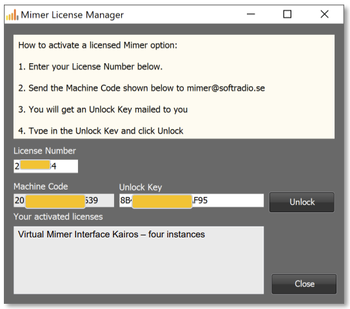
When starting the option, for the first time, you will be asked for an unlock code. You get the code by emailing your license number and a machine code as asked for on the screen. Your email will be answered with the unlock code.

Click the “Yes”-key in the above menu or open the License Manager from the list of programs under the Windows Start menu. 

After entering the received unlock code this process is ready and need no further attention until the day you expand the number of interfaces, or reinstall on the same or another PC/Server.

The information box will tell how many instances of the virtual interface you are allowed to run, 1-15 are possible. 


5

Connections 

You need to configure a few things in order to connect the Virtual Network Interface to the Kairos interface.

You also need to set up the connection for the operators SoftRadio software so that it connects to the Virtual Network Interface. 

User connections to the virtual network interface  

In the same way as with the standard hardware Network Interfaces, many operators can connect local, to the interface, when they are in the same LAN subnet.

Over TCP used on the Internet or over a WAN, two operators can connect at the same time to the virtual interface. If more connections are needed a Mimer RadioServer or Mimer NetworkRepeater can be used. 

Configuration 

Start the application 

Open the Virtual Network Interface application via the short cut on the desktop, or from C:\Mimer Kairos Interface. 

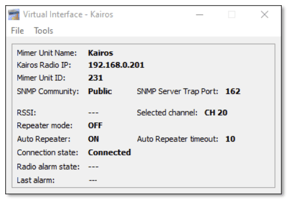
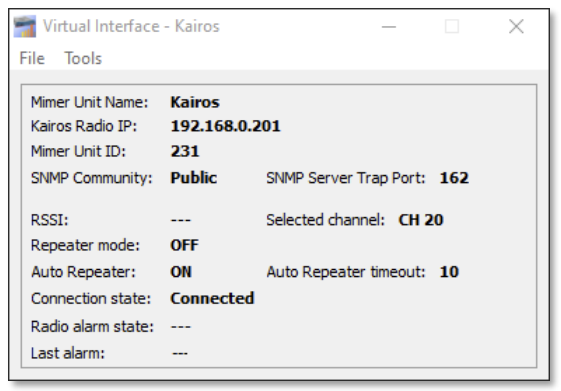
The window shows the status of the connected Kairos base station.

Please note that all functions might not be available on all base stations.


6

System settings 

Click the “Tools” menu in the Virtual Interface and select “Settings”. 

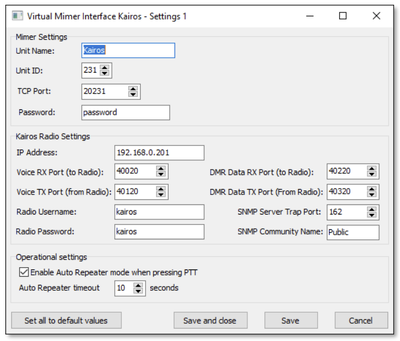
Virtual Network Interface Settings

When all settings are done click “Save” or “Save and close”. 

Mimer Settings 

At the top are the settings that defines the Virtual Network Interface so that the operator software, SoftRadio, can connect. Please also see the standard setup manual for SoftRadio. 

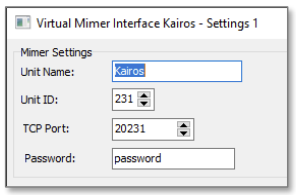
Unit Name 

This is the name that shows up in the “name bar” on all the operators’ software. 

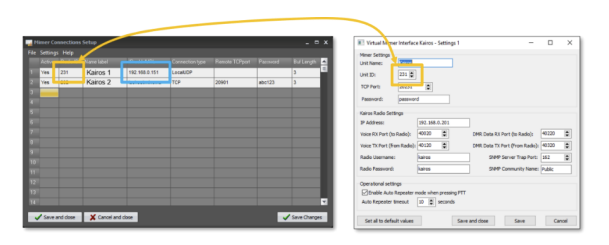
Unit ID 

This is the ID used in the Mimer SoftRadio system. Each device in the SoftRadio system needs to have a unique ID. Numbers can be from 10-240. Default for the virtual interface is 231.

7

The Unit ID (orange above) in the Virtual Network Interface goes into the “Radio ID” box in Mimer Connections Setup.

The IP address (blue above) in Mimer Connections Setup, is the IP of the PC/Server that runs the Virtual Network Interface. (Not the radios IP)

TCP Port 

For connecting the operator(s) over WAN or the Internet a TCP connection is required. Then the TCP server port definition is important. This setting is later entered in Connections Setup at the operator PC, as “Remote TCP port”.

If several instances of the virtual interfaces are run on the same computer the TCP server port has to be unique for each of them.

In a LAN configuration the server port is not used. 

Password 

If you are going to connect the operator(s) to the virtual interface via a TCP connection (WAN or the Internet) then you also need to enter a password.

In a LAN configuration the password is not used. 

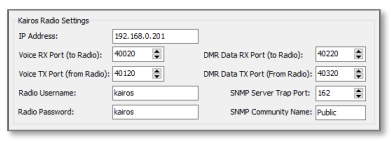
Kairos Radio Settings 

These are the settings needed for the Virtual Network Interface to connect to the radio. 


8

IP Address 

Enter the proper IP address to allow access to the receiver. The IP address that the base station is configured with. 

Voice Ports 

Enter the Rx and Tx Voice Ports as set in the base station. See picture further down. Please note that the TX port must be unique for each instance of the virtual interface, if you run more than one on the same server. 

Radio Username & Password 

Enter the user name and the password the radio requests when you login to it. 

DMR Data ports 

Only used in DMR systems. Enter the ports as specified in the radio. Please note that the TX port must be unique for each instance of the virtual interface, if you run more than one on the same server.

SNMP Server Trap Port 

Enter the IP port number as defined in the setup of the KAIROS radio. (see 6.1 below) Please note that this must be unique for each instance of the virtual interface, if you run more than one on the same server. 

SNMP Community Name 

Enter the Community name as defined in the setup of the KAIROS radio. (see 6.1 below). Default is “public” 

Operational settings 

These are special functions. 
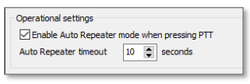
Auto Repeater mode at PTT 

Activating this function means that the base station is set into repeater mode each time the operator transmits. The repeater active time can be set in seconds. This time restarts at each operator PTT. 

Installing the Virtual Interface on the same PC as SoftRadio 

When running the Virtual Network Interface on the same PC as you run SoftRadio, you need to setup a few things different in “Mimer Connections Setup”. In the IP Address field, write: localhost. Then select TCP and enter the TCP port and the password. UDP cannot be used on the same PC due to Windows issues. 

 

9

 More than one virtual interface

To start more instances of the virtual interfaces, click the icon on the start menu, on the desktop, or open from C:\Mimer Kairos Interface.

Repeat the steps above for the second, third and so forth, virtual interfaces.

Your license unlock key for the computer defines the number of virtual interfaces that are possible. 

Radio Settings 

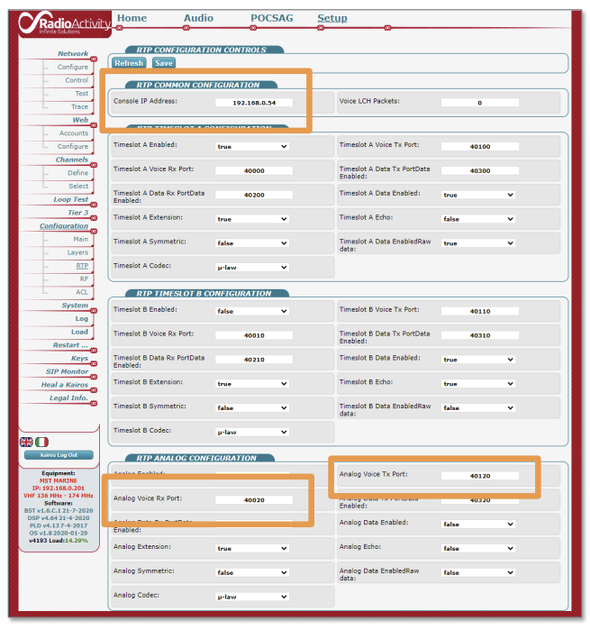
You need to setup and/or check some settings in the radio. 

Console IP Address 

This is the IP address of the PC/Server running the Virtual Network Interface. 

RTP Analog Configuration 

Here you set the voice ports for both Rx and Tx. They need to match the ones set in the Virtual Network Interface. 


10

SNMP functionality

The Kairos base station can report some faults via SNMP traps. These can be directed to the virtual interface and will then be shown on the virtual interface status screen. The faults also activate a status report from the virtual interface, which may be used by script functions in Mimer SoftRadio to indicate these faults. 

Required SNMP settings 

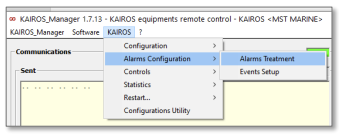
The Kairos radio sends SNMP Traps to a specific IP address and a specific UDP port number. These are configured in the radio using “KAIROS_Manager”. 

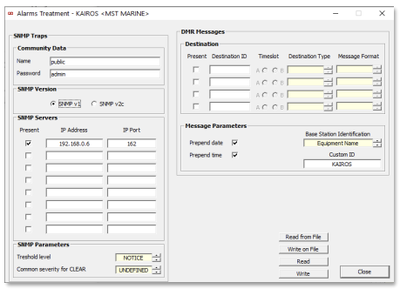
Select the Alarms Treatment page: 

Set Community Data:

Name: Default is “public”.

Password: This is optional and not used with SNMP v1.

Set SNMP Version to SNNMP v1 Set the SNMP Server definition line to “Present” by ticking the checkbox.

Enter the IP address of the server running the virtual Kairos interface.

Enter an IP port where the trap messages shall be sent to on that server. In this example port 162 is defined. This is the default port for SNMP traps 

There has to be a separate IP port number for each instance of virtual interface that you are running on the server with that IP address.

This port number is used to address the trap messages to the right instance of virtual interfaces on the server 


11

Error events 

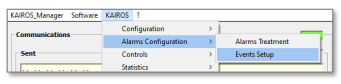
To select the error events that shall send SNMP traps, open “Events Setup: 

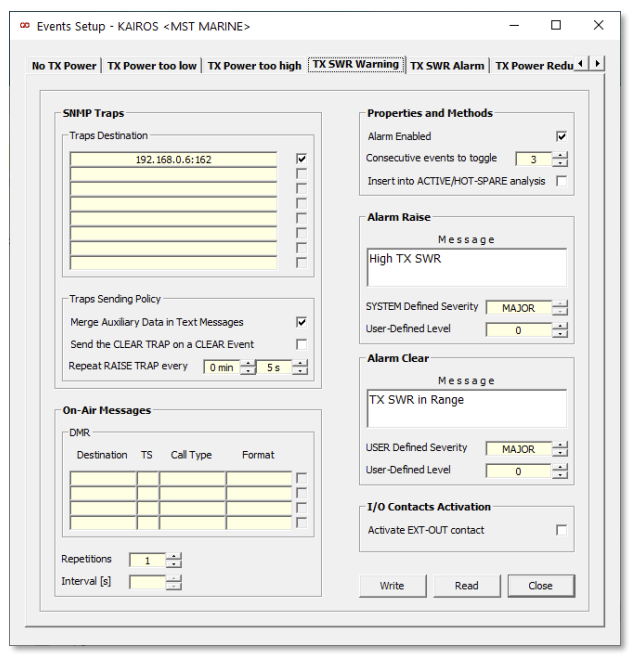
From there check the “Trace destination” for each of the events that shall send traps. The text that is displayed on the Virtual Interface status screen is the messages defined at Alarm Raise and Alarm clear.

Note: Also set up “Repeat RAISE TRAP every 0min 5s” for each one of the events you select. 


Example of setting up an alarm for “Tx SWR Warning” 

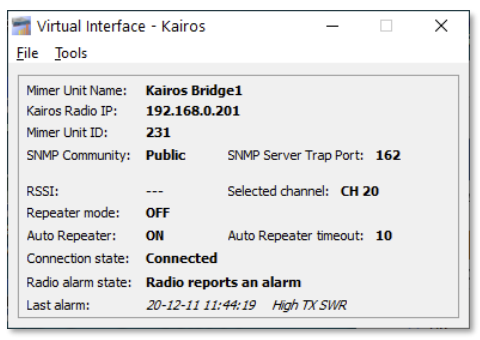
Message in the Virtual Interface 

Example of the displayed error text for the “High TX SWR” event described above: 


12

Error messages 

The following error messages might be shown in the virtual interface if there is a problem with a setting, or with the communication to the base station. 

Connection State: Lost IP Connection 

No connection between virtual interface and base station. Could both be a physical problem or a wrong setting of the IP address to the KAIROS Radio. See 4.2.2.1 above 

Connection State: Login failed 

The Radio Username or Radio Password in KAIROS Radio Settings of the virtual interface might not match the settings in the radio. See 4.2.2.3 above 

No display of RSSI when the radio is receiving 

This is an indication of that the Analog Voice Tx Port setting in the radio and in the virtual interface setup does not match. There will also be no received audio if this setting is wrong. See 4.2.2.2 and 5.2 above 


13
 
Mimer SoftRadio

Proudly made in Sweden

Connect Your Radios.
Anywhere. Over Any Network


Contact

LS Electronics AB

www.lse.se/contact-sales

info@lse.se