<img src="https://www.inventive-7-intuition.com/807131.png" style="display:none;">
 
Company Logo
mimer softradio boxed cmyk


Technical Description

Technical description and set-up instructions

Art n:o
3100
Revision
C
Release date
Sept 16, 2019

A Mimer SoftRadio system can be built and configured in many ways. This paper describes the basic technical buildup of a system. Please also refer to the other manuals regarding setup and using the system, and also the web pages: www.lse.se 


Mimer SoftRadio Backround

The Mimer SoftRadio system consists of software that runs on Windows PC´s (Recommended is Win10). The software works together with one or more Network Interfaces that are connected to two-way radio units. One Network Interface is needed for each radio unit.

The purpose is to remotely control the two-way radio from the PC over a LAN, WAN or the Internet. In this way several operator PC´s can share one radio and every operator control several radios.

The basic control panel displays controls like PTT-button, Speaker on/off, resend, individual volume, etc.

For many radio types the operator will also have available a virtual control head emulating the front panel of the radio. This gives the operator the same feeling as if he was sitting in front of the radio itself. 


3

Connections

In the Network Interface all audio from the radio and all display information on the radio is digitized and sent as UDP or TCP packets over the IP-network to the PC. The PC´s audio card turns the audio back into ordinary sound. 

The PC will also digitise microphone audio and detect key presses from the PC and send them to the Network Interface as UDP or TCP packets. The Network Interface will then control the radio. 

Radio Connection 

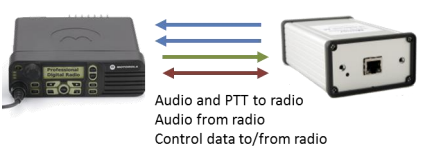
The radio is basically connected to the Network Interface with analogue ports for the audio and a digital port for PTT control.

The Network Interface will take the audio from the radio and digitize it. Digital audio from the operator PC will be transformed back to analogue audio in the Network Interface and then fed into the radio along with PTT and other commands.

Depending on radio type the Network Interface also communicates with the radio over a serial data port or USB port and acts on many radios, from the radios point of view, as a control head. The information gathered by the Network Interface is then sent over the network to the operators PC´s.

Some radios cannot be fully remote controlled, but they can still be controlled regarding for example channel change and squelch setting. 


4

LAN connection

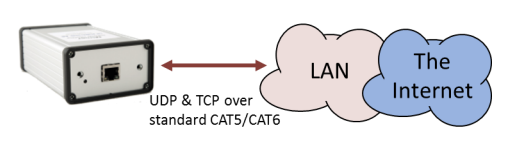
The Network Interface connects to the local LAN over a standard IP-connection, CAT5 or CAT6.

In local LAN´s where both operators and the Network Interfaces are placed in the same IP subnet, normally only UDP data packets are used. In large networks, WAN´s or over the Internet, TCP connections are used.

UDP data out from the interface is broadcasted over the local LAN subnet, and therefore many PC´s in that subnet domain can monitor and control the same radio in parallel. All PC´s will hear everything received by the radio at the same time.

When there is a need to connect outside the local domain, for example through a WAN or via the Internet, a TCP connection is required because UDP broadcasts cannot pass through a router.

Connections can be made using TCP over the Internet and UDP locally in parallel at the same time.

All connected operators will see and hear everything on the radio. If one operator makes a change it is immediately seen at all other operators.

When transmitting, the first operator to push PTT will get control of the transmitter. The other PC´s will see a busy indication while a transmission is active. 

WAN connection

When using TCP only one connection can exist from an operator PC to each Network Interface at any given time. This limitation can however be overcome by using either a Mimer RadioServer placed at the radio site that will allow many TCP connections to each radio, or a Mimer NetworkRepeater placed at the operator site and handling the TCP connection for many operators. Please see the document “RadioServer / NetworkRepeater” for a deeper explanation. 

Other connections 

Apart from fixed radios a lot of other types of equipment can be connected to the system. For example PA & PAGA systems, analogue and digital phone PABX´s, intercoms and more. 

To make the system complete there are also servers for audio recording, servers for GPS positioning and much more. Please refer to www.lse.se. 


5

Technique

Addressing 

The IP-address is statically set in the Network Interface using a setup program.

In the Mimer system all nodes (Network Interfaces and operators) are identified by a unique ID. There can be a total of 240 ID´s in a standard Mimer system.

In the operator PC (Program: Mimer Connections Setup) the IP-address and the ID of each interface is defined for all radios that the operator needs to communicate with.

Connection 

There is also a definition for TCP or UDP connection in the operator PC. In the case of TCP the PC will create and maintain a TCP connection to the interface at the defined IP address using a settable IP port and password. In the case of UDP the PC just listens for the UDP broadcasts.

The Network Interface sends status messages containing the ID each second both via TCP and UDP. The operator PC will recognize this message and identify the interface. The state of each connection can be seen in the Mimer ConnectionManager. 

Lean on bandwidth

Each connected radio will only load the IP network with about 80kbit/second, when someone is talking.

When there is no audio on the system there is only the "keep alive" status burst sent out every second to identify each network interface, and when radio control panel information is changed, small amounts of radio panel data are transferred. 

Distributed intelligence

LAN systems 

In systems where all operators and all Network Interfaces are in the same local LAN, no servers are needed. All intelligence needed is inside the Network Interfaces and in the Mimer SoftRadio software. This makes the system robust, scalable and very flexible.

If one Network Interface fails or one operator PC fails, the rest of the system will continue working. There is no single point that may stop the whole system. This also makes it very easy to make changes, to add units or upgrade to new radio types. 

Wide area systems 

When operators and Network Interfaces are spread out over a large area, you will need to connect through a private WAN or the Internet. The system then uses TCP connections. As described in 3.3 above there can only be one such connection at a time so if more than one operator needs to connect to one radio a server is needed.

For redundancy purposes the servers can be built in parallel and with hot standby functionality. 



6
 
Mimer SoftRadio

Proudly made in Sweden

Connect Your Radios.
Anywhere. Over Any Network


Contact

LS Electronics AB

www.lse.se/contact-sales

info@lse.se