<img src="https://www.inventive-7-intuition.com/807131.png" style="display:none;">
 
Company Logo
Ntif-1


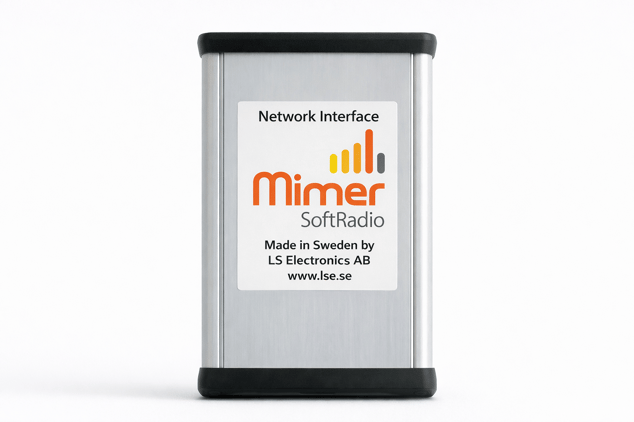
Network Interface

Technical description and set-up instructions

Art n:o
3009
Revision
G
Release date
June 14, 2022

This paper describes the technical part of the Network Interface 3009 in Mimer SoftRadio systems.  

Mimer SoftRadio Background

The Mimer SoftRadio system consists of software that runs on Windows PC’s. The software works together with one or more Network Interfaces that are connected to two-way radio units. One Network Interface is needed for each radio unit.

The purpose is to remotely control the two-way radio from the PC over a LAN, WAN or the Internet. In this way several operator PC’s can share one radio and every operator can control several radios.

The basic control panel GUI displays controls like PTT-button, Speaker on/off, individual volume, etc.

For many radio types the operator will also have available a virtual control head emulating the front panel of the radio. This gives the operator the same feeling as if he was sitting in front of the radio itself.

A small interface (LE) is provided when the virtual control head is not needed. To be used with radios that have a fixed channel / talk group.


3

Technical Specifications

Specifications for the standard version of Mimer Network Interface.

General Specification Details
Size 130 × 80 × 46 mm
Weight <300g (Typical 260g)
Power supply 9-18 Volt / 250mA
Temp range -10 - +50 °C
Connectors RJ45 for Ethernet
D-sub for audio, power, I/O, data and auxiliary I/O
MTBF 350 000 Hours

Audio Specification Details
Input (from radio speaker output) 0.7-13Vpp (0.25-4.5Vrms)
Output (to radio microphone input) 0-1.1Vpp

I/O's Specification Details
3 inputs On = 2.5-30V / Off = 0-0.8V, 47kohm impedance to ground.
Optional reverse-current protected 5.6kohm pull-up to +5V
3 open collector outputs Max 30V / Max 10mA. Reverse-current protected 5.6kohm pull-up to +5V.
Pull-up can optionally be disconnected.
Data I/O for radio control RS232, TTL, USB and other manufacturer-specific protocols
Aux data port* RS232 compatible inputs and outputs

Note: The I/O and data ports are used to interface with different radio types, depending on type of radio, free ports may be available for auxiliary use. There are also special versions of the interface with other types of audio connection (through audio transformers) and other connectors and ports.


4

The Network Interface

The purpose of the Network Interface is to be a bridge between the radio and the computer network. It transforms audio and signalling from analogue to digital and back again.
The Network Interface has a very flexible design so the I/O signals can be configured to fit almost any radio on the market, both Mobile Radios and Base Stations.
The Network Interface has connections for Audio input and output, I/O control signals like Squelch, PTT, Alarm, Off-hook etc. and data signals to and from a control head.
The network connection is a standard 10/100 base-T Ethernet connection. Both TCP and UDP network protocols are available simultaneously depending on the system configuration. This allows a flexible approach for designing the most optimum network based system.
The interface has a design that fits most standard uses with none or very small modifications. For the specific radios with virtual control heads that are supported by Mimer SoftRadio there are versions available where all set-ups and adjustments are already pre-configured.
There are also special Network Interfaces to be used with phone lines or intercom instead of radios, and also interfaces for “Mimer SoftLine”.
The Network Interface runs on 12VDC just as most radios and is therefore easy to power from the same source as the radio, and to feed with backup power. If power is lost, the Network Interface will restart itself in a matter of seconds when the power comes back.
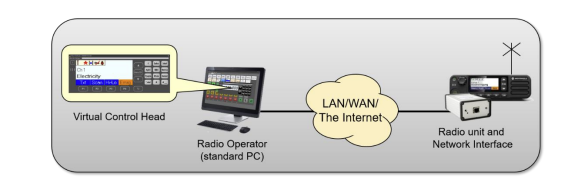
A radio connected to an operator PC



5
 
Mimer SoftRadio

Proudly made in Sweden

Connect Your Radios.
Anywhere. Over Any Network


Contact

LS Electronics AB

www.lse.se/contact-sales

info@lse.se